

Deprecated: Using null as an array offset is deprecated, use an empty string instead in /var/www/staging.extremevpn.com/site/web/wp/wp-includes/class-wp-block-type-registry.php on line 168
Deprecated: Using null as an array offset is deprecated, use an empty string instead in /var/www/staging.extremevpn.com/site/web/wp/wp-includes/class-wp-block-type-registry.php on line 168
Deprecated: Using null as an array offset is deprecated, use an empty string instead in /var/www/staging.extremevpn.com/site/web/wp/wp-includes/class-wp-block-type-registry.php on line 168
Deprecated: Using null as an array offset is deprecated, use an empty string instead in /var/www/staging.extremevpn.com/site/web/wp/wp-includes/class-wp-block-type-registry.php on line 168
Deprecated: Using null as an array offset is deprecated, use an empty string instead in /var/www/staging.extremevpn.com/site/web/wp/wp-includes/class-wp-block.php on line 257
Deprecated: Using null as an array offset is deprecated, use an empty string instead in /var/www/staging.extremevpn.com/site/web/wp/wp-includes/class-wp-block-type-registry.php on line 168
Deprecated: Using null as an array offset is deprecated, use an empty string instead in /var/www/staging.extremevpn.com/site/web/wp/wp-includes/class-wp-block-type-registry.php on line 168
Deprecated: Using null as an array offset is deprecated, use an empty string instead in /var/www/staging.extremevpn.com/site/web/wp/wp-includes/class-wp-block-type-registry.php on line 168
Deprecated: Using null as an array offset is deprecated, use an empty string instead in /var/www/staging.extremevpn.com/site/web/wp/wp-includes/class-wp-block-type-registry.php on line 168
Deprecated: Using null as an array offset is deprecated, use an empty string instead in /var/www/staging.extremevpn.com/site/web/wp/wp-includes/class-wp-block-type-registry.php on line 168
Deprecated: Using null as an array offset is deprecated, use an empty string instead in /var/www/staging.extremevpn.com/site/web/wp/wp-includes/class-wp-block-type-registry.php on line 168
Deprecated: Using null as an array offset is deprecated, use an empty string instead in /var/www/staging.extremevpn.com/site/web/wp/wp-includes/class-wp-block-type-registry.php on line 168
Deprecated: Using null as an array offset is deprecated, use an empty string instead in /var/www/staging.extremevpn.com/site/web/wp/wp-includes/class-wp-block-type-registry.php on line 168
Deprecated: Using null as an array offset is deprecated, use an empty string instead in /var/www/staging.extremevpn.com/site/web/wp/wp-includes/class-wp-block-type-registry.php on line 168
Deprecated: Using null as an array offset is deprecated, use an empty string instead in /var/www/staging.extremevpn.com/site/web/wp/wp-includes/class-wp-block.php on line 257
Deprecated: Using null as an array offset is deprecated, use an empty string instead in /var/www/staging.extremevpn.com/site/web/wp/wp-includes/class-wp-block-type-registry.php on line 168
Deprecated: Using null as an array offset is deprecated, use an empty string instead in /var/www/staging.extremevpn.com/site/web/wp/wp-includes/class-wp-block-type-registry.php on line 168
Deprecated: Using null as an array offset is deprecated, use an empty string instead in /var/www/staging.extremevpn.com/site/web/wp/wp-includes/class-wp-block-type-registry.php on line 168
Deprecated: Using null as an array offset is deprecated, use an empty string instead in /var/www/staging.extremevpn.com/site/web/wp/wp-includes/class-wp-block-type-registry.php on line 168
Deprecated: Using null as an array offset is deprecated, use an empty string instead in /var/www/staging.extremevpn.com/site/web/wp/wp-includes/class-wp-block-type-registry.php on line 168
Deprecated: Using null as an array offset is deprecated, use an empty string instead in /var/www/staging.extremevpn.com/site/web/wp/wp-includes/class-wp-block-type-registry.php on line 168
Deprecated: Using null as an array offset is deprecated, use an empty string instead in /var/www/staging.extremevpn.com/site/web/wp/wp-includes/class-wp-block-type-registry.php on line 168
Deprecated: Using null as an array offset is deprecated, use an empty string instead in /var/www/staging.extremevpn.com/site/web/wp/wp-includes/class-wp-block-type-registry.php on line 168
Deprecated: Using null as an array offset is deprecated, use an empty string instead in /var/www/staging.extremevpn.com/site/web/wp/wp-includes/class-wp-block-type-registry.php on line 168
Deprecated: Using null as an array offset is deprecated, use an empty string instead in /var/www/staging.extremevpn.com/site/web/wp/wp-includes/class-wp-block.php on line 257
Deprecated: Using null as an array offset is deprecated, use an empty string instead in /var/www/staging.extremevpn.com/site/web/wp/wp-includes/class-wp-block-type-registry.php on line 168
Deprecated: Using null as an array offset is deprecated, use an empty string instead in /var/www/staging.extremevpn.com/site/web/wp/wp-includes/class-wp-block-type-registry.php on line 168
Deprecated: Using null as an array offset is deprecated, use an empty string instead in /var/www/staging.extremevpn.com/site/web/wp/wp-includes/class-wp-block-type-registry.php on line 168
Deprecated: Using null as an array offset is deprecated, use an empty string instead in /var/www/staging.extremevpn.com/site/web/wp/wp-includes/class-wp-block-type-registry.php on line 168
Deprecated: Using null as an array offset is deprecated, use an empty string instead in /var/www/staging.extremevpn.com/site/web/wp/wp-includes/class-wp-block-type-registry.php on line 168
Deprecated: Using null as an array offset is deprecated, use an empty string instead in /var/www/staging.extremevpn.com/site/web/wp/wp-includes/class-wp-block-type-registry.php on line 168
Deprecated: Using null as an array offset is deprecated, use an empty string instead in /var/www/staging.extremevpn.com/site/web/wp/wp-includes/class-wp-block-type-registry.php on line 168
Deprecated: Using null as an array offset is deprecated, use an empty string instead in /var/www/staging.extremevpn.com/site/web/wp/wp-includes/class-wp-block-type-registry.php on line 168
Deprecated: Using null as an array offset is deprecated, use an empty string instead in /var/www/staging.extremevpn.com/site/web/wp/wp-includes/class-wp-block-type-registry.php on line 168
Deprecated: Using null as an array offset is deprecated, use an empty string instead in /var/www/staging.extremevpn.com/site/web/wp/wp-includes/class-wp-block.php on line 257
Deprecated: Using null as an array offset is deprecated, use an empty string instead in /var/www/staging.extremevpn.com/site/web/wp/wp-includes/class-wp-block-type-registry.php on line 168
Deprecated: Using null as an array offset is deprecated, use an empty string instead in /var/www/staging.extremevpn.com/site/web/wp/wp-includes/class-wp-block-type-registry.php on line 168
Deprecated: Using null as an array offset is deprecated, use an empty string instead in /var/www/staging.extremevpn.com/site/web/wp/wp-includes/class-wp-block-type-registry.php on line 168
Deprecated: Using null as an array offset is deprecated, use an empty string instead in /var/www/staging.extremevpn.com/site/web/wp/wp-includes/class-wp-block-type-registry.php on line 168
Deprecated: Using null as an array offset is deprecated, use an empty string instead in /var/www/staging.extremevpn.com/site/web/wp/wp-includes/class-wp-block-type-registry.php on line 168
How to Configure ExtremeVPN on DD-WRT Router
Consider setting up ExtremeVPN on your DD-WRT router to enhance safety and security. If you don’t know how you can set it up, follow these simple instructions we’re listing down here:
Factors to Consider
- Stable Internet Connection
- A device compatible with VPN
- A premium account of ExtremeVPN (Click here to get a subscription if you don’t have one already)
- DD-WRT: v24 Build 13309 or newer. (Proceed to the Status bar. Check the Firmware version below the System tab)
- Supported Builds: OpenVPN, Mega, Giga, Big
- The router should have an 8 MB flash memory to install OpenVPN.
To find your VPN credentials, go to the member panel of ExtremeVPN.
- Sign in to the Member area using your ExtremeVPN email and password.
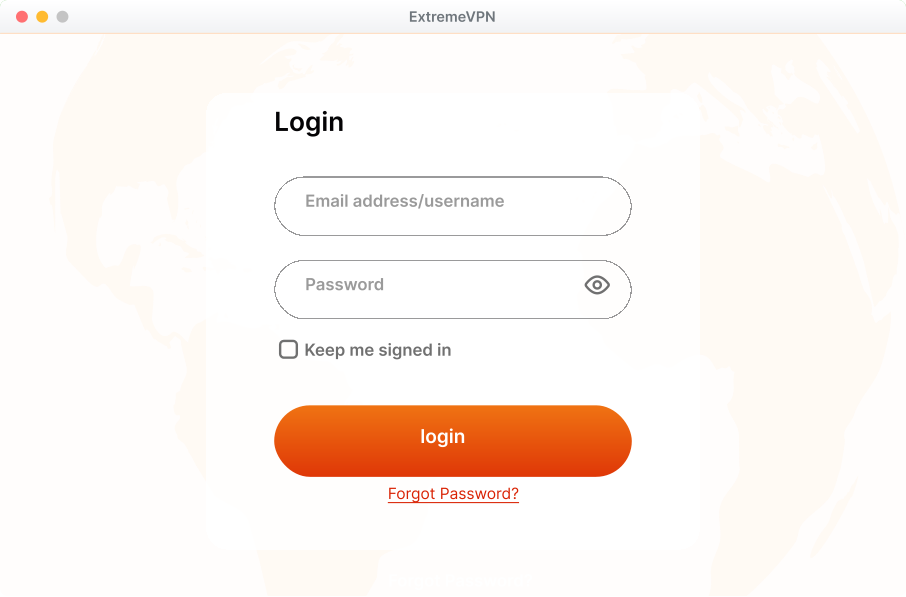
- The VPN credentials will be available in the subscriptions tab. Scroll down to check them.
- You can now view or copy your credentials.
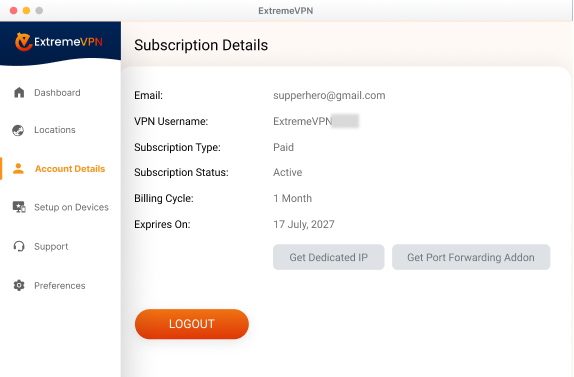
- Note your username and view your password by clicking the Eye icon button.
- Once you’ve found the credentials, you can manually configure them.
- Go to the router panel by inserting 192.168.1.1 in the browser search bar.
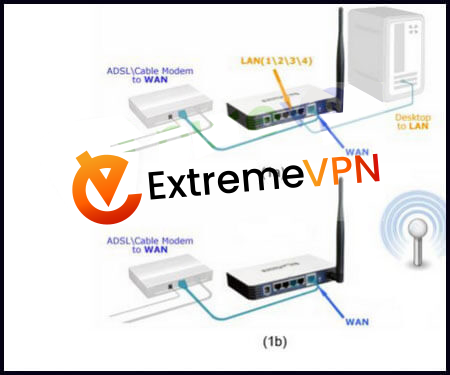
- Proceed to the Administration tab, then click on Commands. After this, type in this command:
eval wget -q -O – https://routerapplet.staging.extremevpn.com/cgi-bin/applet-cgi.py - The command will display that the applet is now installed successfully.
- Go to the Status tab, and press on the My Page.
- Insert your ExtremeVPN credentials, then press Save.
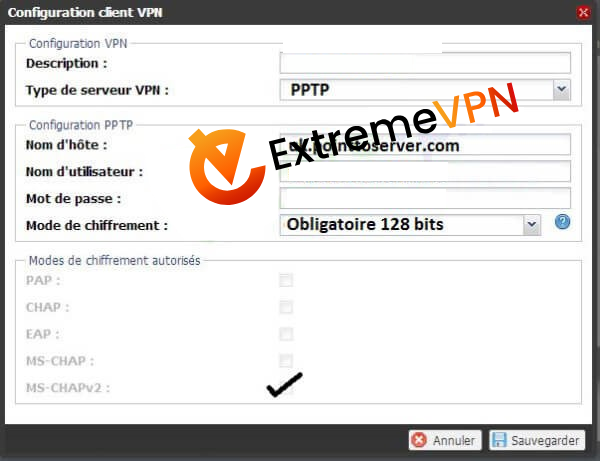
- Switch it to Protocol and Server, and then hit Save. Press Connect to begin the connection.
- Once you’ve connected successfully, it will display a notification.
- Hurray, ExtremeVPN is now configured on your router successfully.
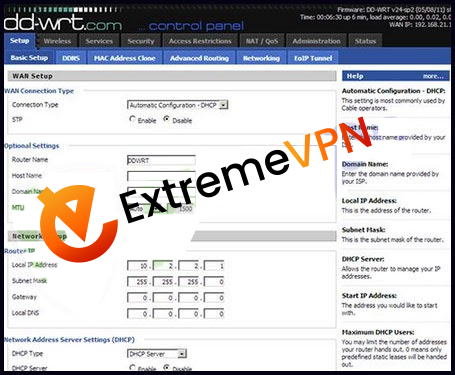
- Access the Basic setup tab of your DD-WRT control panel.
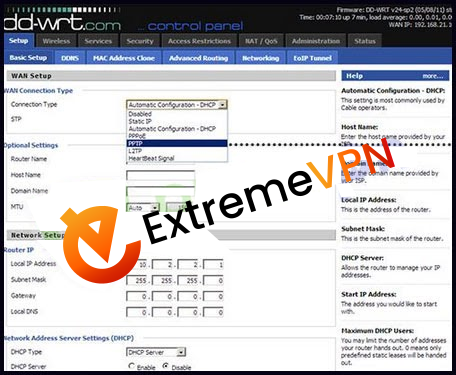
- Tap on the Connection type; it will display a menu. Select PPTP protocol.
- Verify that Use DHCP is decided as Yes.
- Type in the following information:
- Gateway PPTP Server: (You can use any of these servers mentioned below)
- Germany: de1.pointtoserver.com
- Netherlands: nl1.pointtoserver.com
- United Kingdom: ukl1.pointtoserver.com
- United States: usil1.pointtoserver.com
- United States: ustx1.pointtoserver.com
- United States: usca1.pointtoserver.com
- United States: usfl1.pointtoserver.com
- United States: usny1.pointtoserver.com
- United States: uswdc1.pointtoserver.com
- Australia: au-sd1.pointtoserver.com
- Insert the ExtremeVPN login details.
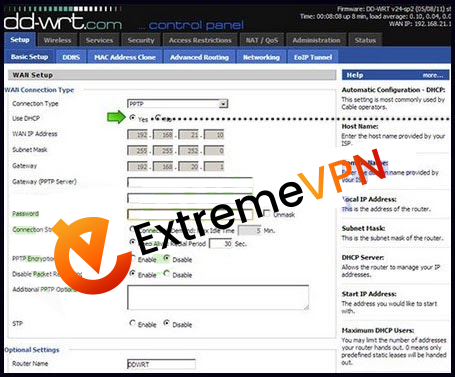
- Enter “refuse-eap” in the additional PPTP option box.
- Scroll down and confirm that the DHCP server is turned on. Now tap Apply Settings and hit Save.
- From the top menu, tab Status, and then the WAN tab.
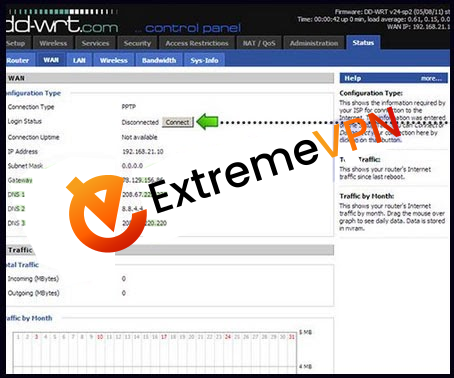
- Now press Connect button.
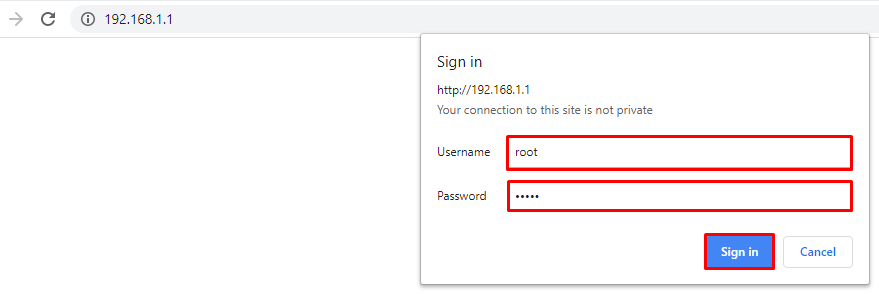
- Sign in to the router control panel and enter the router’s IP 192.168.1.1 in the address bar of your default browser (If you’re using a different IP address, insert that into your address tab). Type your administrator username and password for your router, then press Sign In.
- To set up OpenVPN on DD-WRT, download the OpenVPN files first. Use this link to get the files. Extract them after installing.
- Move to the Services tab, then the VPN tab and press Enable option in front of the
- Start OpenVPN client.
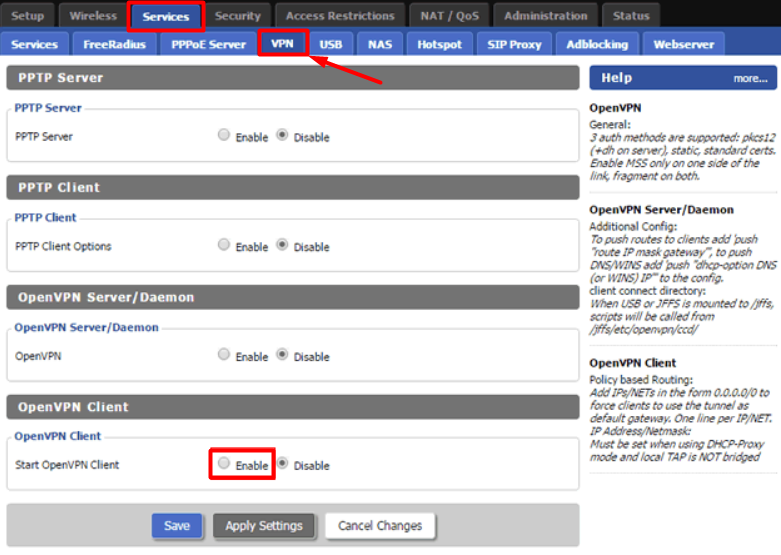
- Not set up your VPN client as follows:
OpenVPN Client: Turn it on
CVE Mitigation: Deactivate it
Server IP/Name: Insert your preferred location’s UDP/TCP server address here.
Port: 80 (For TCP)/ 53 (For UDP)
Tunnel Device: TUN
Tunnel Protocol: UDP/TCP
Encryption Cipher: AES-256-CBC
Hash Algorithm: SHA-1
Inbound Firewall on TUN: Mark it unchecked
User Pass Authentication: Check mark this one.
Username and Password: Type in your ExtremeVPN login details.
Advanced Options: Enable it.
TLS Cipher: None
Compression: Adaptive
NAT: Enable
Firewall Protection: Disable
Tunnel UDP MSS-Fix: Disable
Verify Server Cert.: Checked
TLS Key Choice: TLS Auth
TLS Key: Paste all the data from your downloaded key file with the OpenVPN configuration files.
Additional Config:
persist-key
Persist-tun - CA Cert: Paste all the data from the crt file you downloaded with the OpenVPN configuration files.
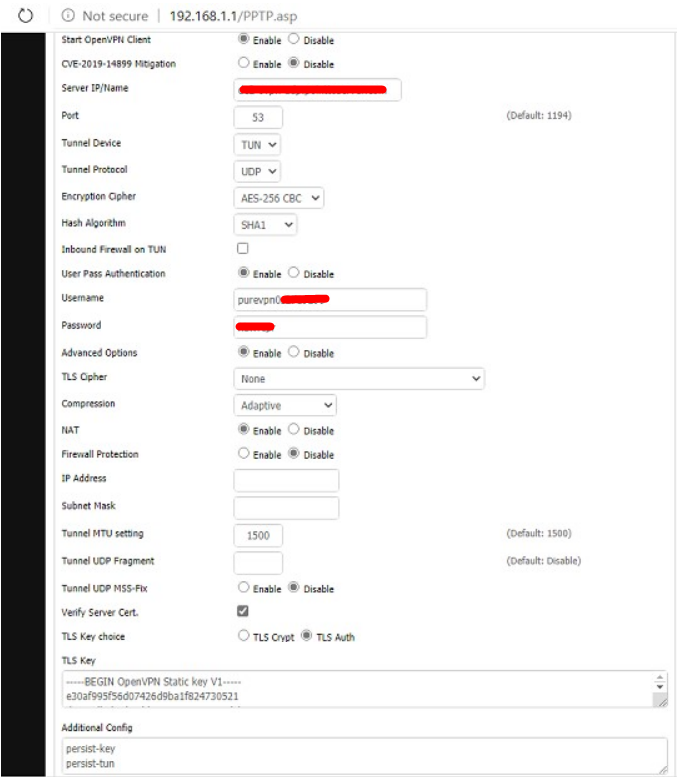
- Press Save and Confirm by tapping Apply Settings button.
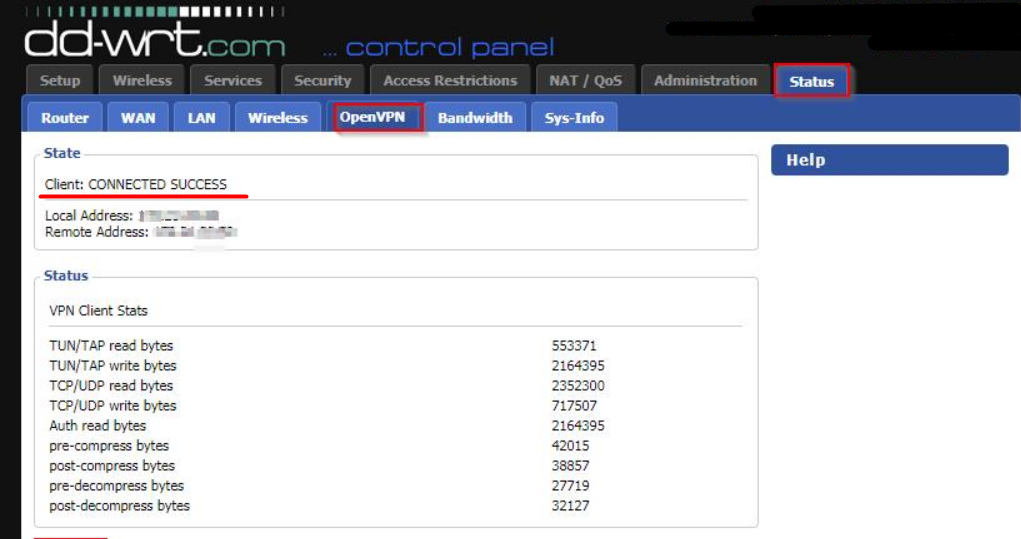
- Now move to the Status tab, navigate to the OpenVPN tab, and verify the connection status.
Follow these instructions to set up OpenVPN on DD-WRT routers with a script.
- Go to this link to download the Script File.
- Visit this link to download the OpenVPN config file.
- Go to the Administration tab and then select the Commands tab.
- Open ExtremeVPN_DD_WRT_OVPN_Script.txt that you got from the link. Copy and paste the contents under the command tab.
- Replace the password and username with ExtremeVPN Credentials. Install OpenVPN
- Files and get the server address from OpenVPN Files.
- Press Save Startup.
- Hurray, your connection is now successful.
Got help from this guide? Give your valuable comments below. Your recommendations matter to us and everyone else in our Cyber Security Community.
Deprecated: Using null as an array offset is deprecated, use an empty string instead in /var/www/staging.extremevpn.com/site/web/app/plugins/advanced-custom-fields-pro/includes/class-acf-data.php on line 127
Deprecated: Twig\Node\Expression\Filter\DefaultFilter::__construct(): Implicitly marking parameter $tag as nullable is deprecated, the explicit nullable type must be used instead in /var/www/staging.extremevpn.com/site/vendor/twig/twig/src/Node/Expression/Filter/DefaultFilter.php on line 32
Deprecated: Using null as an array offset is deprecated, use an empty string instead in /var/www/staging.extremevpn.com/site/web/app/plugins/advanced-custom-fields-pro/includes/class-acf-data.php on line 127
Comments
No comments.